What Is Internet Latency? How to Measure and Reduce It (2026)
You can have 500 Mbps download speed and still have terrible internet for gaming, video calls, and browsing — if your latency is high. This guide explains why latency matters more than speed and how to fix it.
1. What is latency?
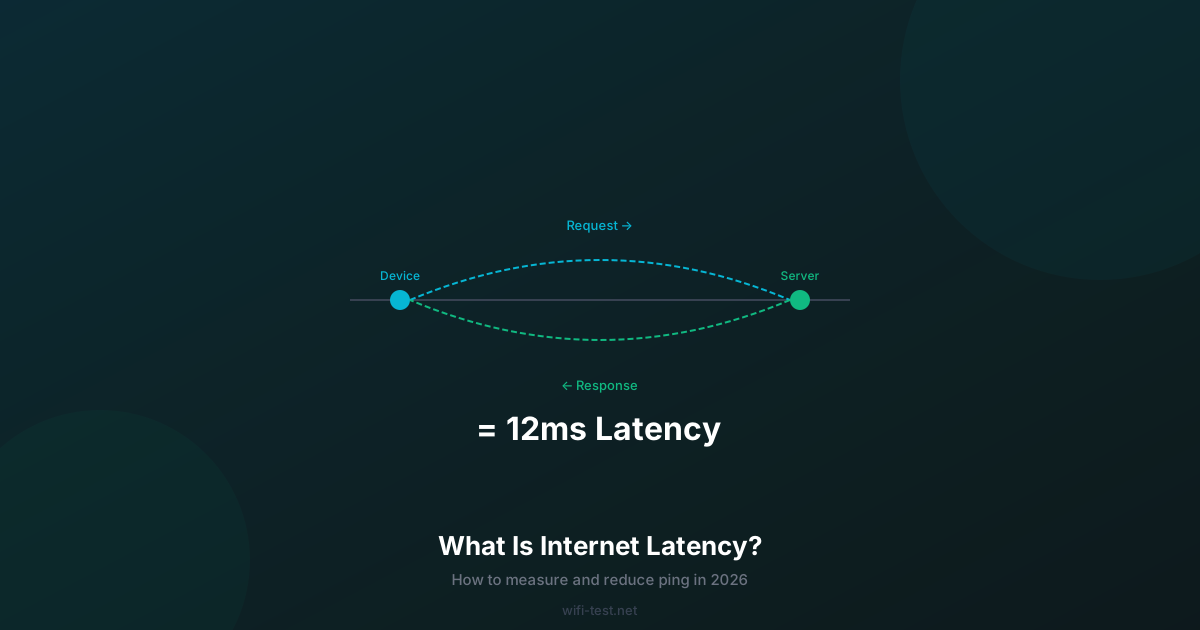
Latency is the time it takes for a single data packet to travel from your device to a server and back again. It's measured in milliseconds (ms). You'll also see it called ping, round-trip time (RTT), or simply response time.
Unlike bandwidth (how much data can flow at once), latency measures how fast each individual exchange happens. Think of bandwidth as the width of a pipe and latency as how far the pipe reaches. A wide pipe that reaches far is fast — but a narrow pipe to a nearby server may feel snappier than a wide pipe to a server on another continent.
2. Why latency matters more than speed for some tasks
Every time you click a link, load an image, send a message, or fire a weapon in a game, your device sends a request and waits for a response. If latency is 200ms, every single interaction has a 200ms delay before anything happens. On a web page with 50 resources (images, scripts, fonts), high latency multiplies: even with fast download speeds, page loads feel sluggish.
- Gaming: Competitive games update 60–128 times per second. At 100ms latency, you're reacting to a world that's 100ms in the past. At 15ms, the world is essentially real-time.
- Video calls: Zoom recommends under 150ms for acceptable calls. Above 300ms, participants start talking over each other because the audio delay causes people to fill silences that aren't actually there.
- Web browsing: HTTP/3 and modern browsers minimise latency impact with prefetching and parallel requests, but high latency still causes noticeable load time increases on complex pages.
- Streaming (Netflix, YouTube): Latency has almost no impact on buffered video streaming. Buffering adds artificial delay anyway.
3. What is good latency?
- Under 10ms: Excellent. Typical for fiber broadband on local servers.
- 10–30ms: Good. Standard for cable broadband; acceptable for competitive gaming.
- 30–60ms: Acceptable. Typical for 5G home internet and distant servers.
- 60–100ms: Noticeable. Video calls start to feel slightly delayed; gaming becomes frustrating for fast-paced games.
- Over 100ms: Poor. Noticeable on most real-time activities. Often caused by satellite internet, poor WiFi, or routing issues.
4. What causes high latency?
Physical distance
Light travels through fibre optic cable at roughly 200,000 km/s. A packet to a server 3,000 km away has a minimum one-way travel time of 15ms — and round-trip is 30ms before any processing. A packet to a server on another continent may have 80–150ms of unavoidable physical latency. You cannot reduce this without choosing a closer server.
Wireless hop (WiFi)
WiFi adds 3–25ms to latency vs Ethernet. It also adds jitter — variation in ping — which is often more disruptive than a consistently high ping. A ping that fluctuates between 20ms and 120ms is worse than a steady 50ms.
Bufferbloat
Bufferbloat is one of the most common and overlooked causes of high latency. When your connection is saturated (e.g., a large download is running), older router firmware queues packets in a large buffer. This causes latency to spike from 20ms to 300–500ms during downloads. Modern routers with Smart Queue Management (SQM) or FQ-CoDel algorithm prevent this. Check your router's settings for "QoS" or "SQM".
ISP routing
Your packets travel through multiple ISP routers (hops) before reaching their destination. Poor peering arrangements between ISPs can add 20–80ms of unnecessary latency for traffic destined to certain networks. This is visible via traceroute — look for hops with disproportionately large delays.
5. How to measure your latency
Run the wifi-test.net speed test — it measures ping and jitter alongside download/upload speed. For a more detailed view:
- Windows:
ping 8.8.8.8 -n 20— sends 20 pings to Google's DNS server. Note min, max, and average. - macOS/Linux:
ping -c 20 8.8.8.8— same thing. - Traceroute:
tracert 8.8.8.8(Windows) ortraceroute 8.8.8.8(Mac/Linux) — shows each network hop and its latency.
Run the test twice: once with nothing else using the network (baseline), and once while streaming a 4K video or running a large download. The difference reveals whether you have a bufferbloat problem.
6. Eight ways to reduce latency
- Switch to Ethernet: Removes the WiFi hop entirely. Cuts typical ping by 5–20ms and eliminates WiFi jitter.
- Restart your router: Routers accumulate stale ARP cache and routing table entries. A restart clears these and often reduces ping by 5–15ms.
- Enable QoS / SQM on your router: Prevents bufferbloat. Single most impactful change for latency under load.
- Choose the nearest server: In games and cloud services, always select the closest available server. Latency increases 10ms per 1,000 km.
- Change your DNS to 1.1.1.1: Cloudflare's DNS resolves domain names faster than most ISP DNS servers, reducing the initial connection latency for every new connection.
- Close background applications: Windows Update, cloud sync, and backup apps upload or download in the background. Even 5 Mbps of background traffic can cause bufferbloat-induced latency spikes.
- Upgrade your router firmware: Old firmware often has unoptimised packet handling. Router manufacturers regularly release firmware updates that improve latency, particularly for congestion control.
- Switch ISP or connection type: If your ping to domestic servers is consistently above 50ms on cable/DSL, your ISP routing may be suboptimal. Fiber typically delivers 5–15ms to local servers vs 20–40ms on cable.
7. Latency vs jitter: what's the difference?
Latency is the average round-trip time. Jitter is the variation between successive pings. A connection with 30ms latency and 2ms jitter is smooth and predictable. A connection with 30ms average latency and 25ms jitter means individual packets may take anywhere from 5ms to 55ms — which causes audio glitches in calls, rubber-banding in games, and stuttering in video.
WiFi is the primary source of jitter on home connections. Ethernet has near-zero jitter. If your jitter is above 10ms, switching to Ethernet is the most direct fix.
Conclusion
High latency makes fast internet feel slow. The fix order: Ethernet cable → QoS/SQM → DNS to 1.1.1.1 → close background apps → choose nearest servers. These steps collectively can reduce latency by 30–80% on a typical home connection. Test your ping and jitter now to see where you stand.
▶ Test your latency and jitter — free