What Is Mbps? Internet Speed Units Explained Simply (2026)
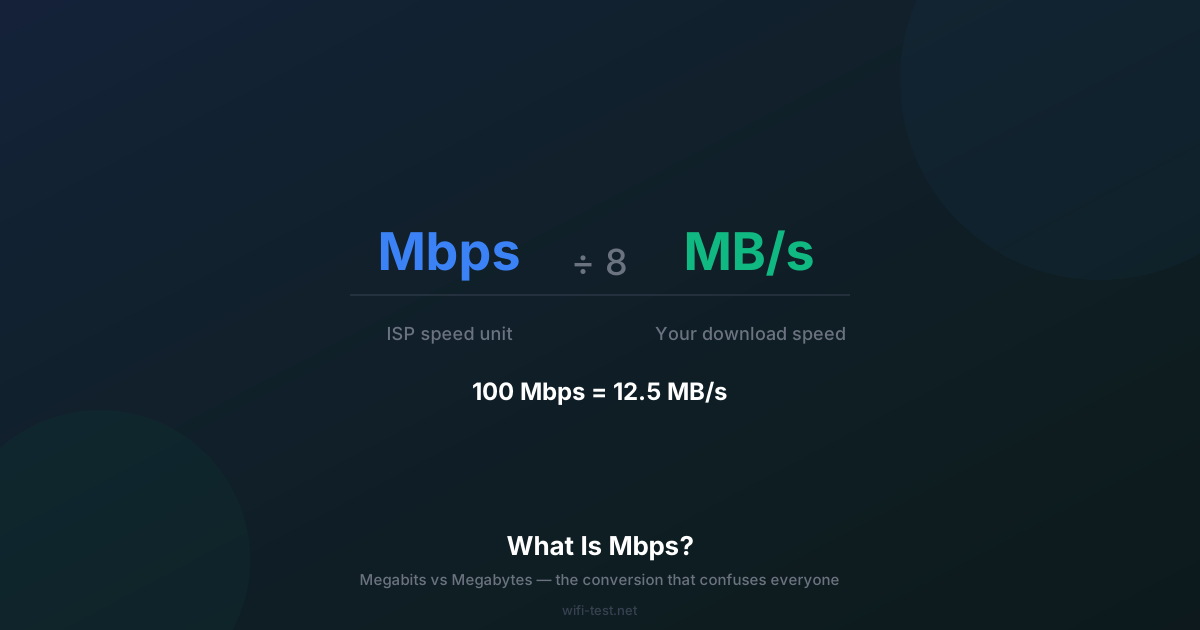
ISPs measure in Megabits. Your download manager shows Megabytes. These are not the same — and the difference is why your "100 Mbps" connection shows 12 MB/s in your browser.
1. Mbps: Megabits per second
Mbps stands for Megabits per second. This is the unit ISPs use to advertise and sell internet plans. One Megabit = 1,000,000 bits = 1,000 kilobits.
When your speed test says 100 Mbps, it means your connection is transferring 100 million bits every second.
2. MB/s: Megabytes per second (very different!)
MB/s stands for Megabytes per second. This is the unit your browser, download manager, and file transfers show. One Megabyte = 8 Megabits.
The conversion: Mbps ÷ 8 = MB/s
- 100 Mbps plan → ~12.5 MB/s download speed
- 300 Mbps plan → ~37.5 MB/s download speed
- 1000 Mbps (1 Gbps) plan → ~125 MB/s download speed
- 25 Mbps plan → ~3.1 MB/s download speed
This is why downloads never look as fast as your plan number — your ISP is telling the truth, they're just using a different unit.
3. The full unit hierarchy
- kbps (kilobits per second): Old DSL territory. 1,000 kbps = 1 Mbps. Modern streaming requires at least 3,000–5,000 kbps.
- Mbps (Megabits per second): Standard broadband unit. 25–1,000 Mbps covers most home plans in 2026.
- Gbps (Gigabits per second): Premium fiber territory. 1 Gbps = 1,000 Mbps. Available from most fiber providers.
- Tbps (Terabits per second): Backbone-level infrastructure. Internet exchange points and submarine cables operate at this scale.
4. Why ISPs use Megabits (instead of Megabytes)
A 100 Mbps plan sounds much more impressive than "12.5 MB/s" — and both descriptions are technically correct. ISPs standardised on bits because the underlying network protocols work in bits (TCP, IP, Ethernet are all bit-based). The convention stuck, and the industry has no incentive to change it.
Note: Megabytes are sometimes abbreviated "MB" (capital B) and Megabits as "Mb" (lowercase b). Not all documentation follows this convention, which adds to the confusion.
5. Real-world download time calculator
How long does it take to download common file sizes? Formula: Time (seconds) = File size (MB) × 8 ÷ Speed (Mbps)
- 1 GB game update at 100 Mbps: 1,000 × 8 ÷ 100 = 80 seconds
- 1 GB game update at 500 Mbps: 1,000 × 8 ÷ 500 = 16 seconds
- 70 GB AAA game at 100 Mbps: 70,000 × 8 ÷ 100 = 93 minutes
- 70 GB AAA game at 1000 Mbps: 70,000 × 8 ÷ 1000 = 9.3 minutes
- 4K movie (15 GB) at 50 Mbps: 15,000 × 8 ÷ 50 = 40 minutes
These are theoretical maximums. Real-world speeds are often 10–20% lower due to protocol overhead, server limits, and network congestion.
6. Mbps vs MBps: the capitalisation trap
Pay close attention to capitalisation:
- Mbps = Megabits per second (ISP speed units)
- MBps = Megabytes per second (file transfer units)
- Gbps = Gigabits per second
- GBps = Gigabytes per second
1 MBps = 8 Mbps. When a router says "2.4 GBps" throughput, that's 2.4 Gigabytes per second = 19.2 Gbps — a spec for the internal switching fabric, not WiFi speed.
7. What Mbps do you actually need?
- Browsing + social media: 5–10 Mbps
- HD streaming (1080p): 5–15 Mbps
- 4K streaming (Netflix, Disney+): 25 Mbps
- Online gaming (latency matters more than speed): 3–10 Mbps
- 4K video calls (Zoom): 15 Mbps upload
- Household of 4, all simultaneous: 100–200 Mbps recommended
Read our complete guide on what is a good internet speed for a full breakdown by use case. Then run a speed test to see where you stand today.
Conclusion
Mbps measures bits per second. Your download manager shows Megabytes per second. Divide by 8 to convert. A 100 Mbps plan delivers about 12.5 MB/s of actual download throughput — not 100 MB/s. Once you internalise this conversion, confusing marketing claims become much clearer.
▶ Find out your actual Mbps — run a speed test